


Everyone has AI now. That’s exactly why it stopped being an advantage.
Most firms use it the same way. Open a chat, explain the business, explain the buyer, ask for an email, copy it out, close the tab. Tomorrow, do it all again. Same tool, same prompts, same messages as every other firm, and buyers can tell.
AI isn’t the edge. What you feed it is.
Claude Code is how I feed it. Instead of explaining my business to every new chat, it reads files that already know it: who we help, what we’ve learned, how we write. Then it runs the work I’d otherwise repeat by hand.
If you’ve been meaning to set it up for your sales and marketing work and haven’t got round to it, this post is for you. It covers when a normal chat is enough, when it’s worth building something, four go-to-market workflows to start with, and a four-week rollout you can run alongside your normal week.
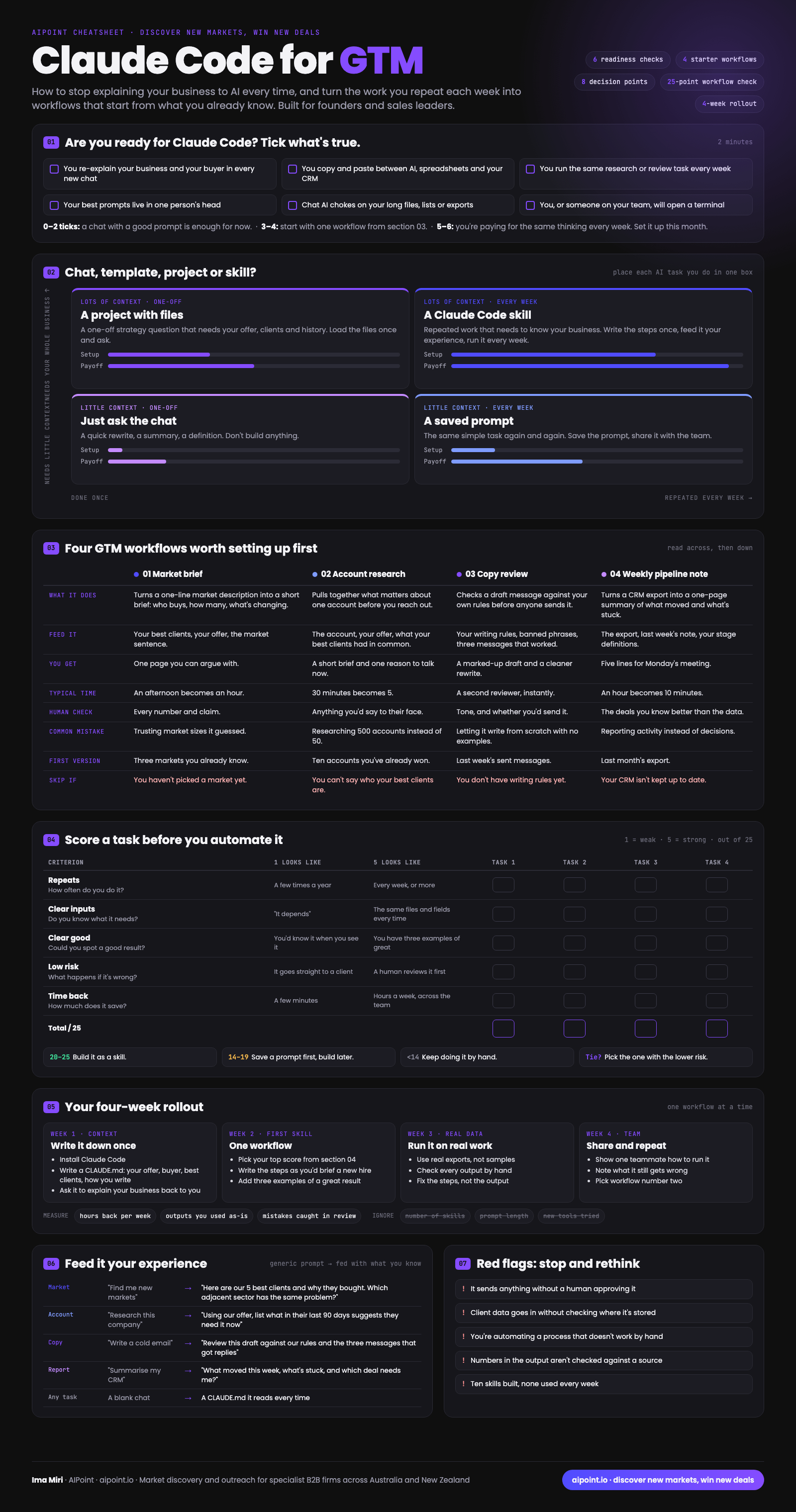
Want the one-page version? Everything in this post is on the Claude Code for GTM cheatsheet: six readiness checks, the chat vs skill map, four starter workflows across eight decisions, a 25-point check and a four-week rollout. It’s attached to this newsletter.
What Claude Code is, in plain terms
Claude Code is Anthropic’s AI assistant that runs on your own computer, inside a folder you choose. That one difference changes how it works for sales and marketing:
It reads files, not just messages. Your offer, your best client list, your writing rules, last month’s CRM export. You write them once and it reads them every time.
It follows written steps. A “skill” is a short instruction file: here’s the job, here’s what to read, here’s what good looks like, here’s what to check. You brief it once, like a new hire, and reuse the brief every week.
It works on real files. Long spreadsheets and exports that choke a chat window are normal work for it.
You don’t need to be a developer. You do need to be comfortable opening a terminal, or have someone on the team who is.
First, are you ready for it?
Not everyone needs Claude Code. Tick what’s true for you right now:
You re-explain your business and your buyer in every new chat.
You copy and paste between AI, spreadsheets and your CRM.
You run the same research or review task every week.
Your best prompts live in one person’s head.
Chat AI struggles with your long files, lists or exports.
You, or someone on your team, will open a terminal.
0 to 2 ticks: a chat with a good saved prompt is enough for now. 3 to 4: start with one workflow from later in this post. 5 or 6: you’re paying for the same thinking every week. Set it up this month.
Chat, saved prompt, project or skill?
The most common mistake isn’t using AI too little. It’s building too much, too early. Before you build anything, place each AI task you do on this map. It asks two questions: how much does the task need to know about your business, and how often do you do it?

Just ask the chatA saved prompt
Just ask the chat. A quick rewrite, a summary, a definition. Don’t build anything.
A saved prompt. The same simple task again and again. Save the prompt, share it with the team, done.
A project with files. A one-off strategy question that needs your offer, clients and history. Load the files once and ask.
A Claude Code skill. Repeated work that needs to know your business. This is where the time comes back, because you stop paying for the same context every week.
Only the top right box needs Claude Code. Most firms have three or four tasks that belong there, and that’s plenty to start.
The one file that changes everything: CLAUDE.md
Before any workflow, write one file. Claude Code reads a file called CLAUDE.md every time it starts, so this is where you stop re-explaining your business.
Keep it to a page. Here’s the shape, for a made-up engineering consultancy:
# About usSpecialist water engineering consultancy, 40 staff, Queensland and NSW.
We help tier 1 and 2 contractors get water projects through approvals.
# Our best clients and why they bought
1. [Client type]: approvals were holding up a funded project
2. [Client type]: needed local knowledge for a new region
3. ...
# Who we sell to
Project directors and commercial managers at contractors.
Not: councils (long tender cycles), homeowners.
# How we write
Plain Australian English. Short sentences. No hype.
Lead with the buyer's problem, not our services.
Never: "leading provider", "solutions", "touch base".
# Rules
Nothing goes to a client or prospect without a human reading it first.
That last line matters more than it looks. More on that in the red flags.
Notice what’s in there: your best clients and why they bought. That’s the experience you’re feeding it. A generic AI knows nothing about why your clients chose you. Yours does, from the first day.
Four GTM workflows worth setting up first
These four are a good first set for most specialist firms, because they repeat, they need your context, and a human checks the output before it matters.
1. Market brief
What it does: turns a one-line market description into a short brief. Who buys, roughly how many there are, what’s changing for them.
Feed it: your best clients, your offer, and the market in one sentence, for example “water engineering consultancies of 20 to 100 staff in Queensland”.
You get: one page you can argue with. The aim is to turn an afternoon of desk research into an hour of checking.
Human check: every number and every claim. Treat its market sizes as a starting point, never the answer. Count the market properly before you commit to it.
Common mistake: trusting a number it guessed.
Skip it if: you haven’t picked a market yet. Do that first.
2. Account research
What it does: pulls together what matters about one account before you reach out.
Feed it: the account, your offer, and what your best clients had in common.
You get: a short brief and one reason to talk now.
Human check: anything you’d say to their face.
Common mistake: researching 500 accounts instead of the 50 that matter. Depth on a short list beats a long list of shallow notes.
Skip it if: you can’t yet say who your best clients are.
3. Copy review
What it does: checks a draft message or post against your own writing rules before anyone sends it.
Feed it: your writing rules, the phrases you never use, and three messages that got real replies.
You get: a marked-up draft and a cleaner rewrite. In effect, a second reviewer who is always available.
Human check: tone, and whether you’d actually send it.
Common mistake: asking it to write from scratch with no examples. Reviewing your draft against your rules works far better than generating something new.
Skip it if: you don’t have writing rules yet. Write five, then build this.
4. Weekly pipeline note
What it does: turns a CRM export into a one-page summary of what moved and what’s stuck.
Feed it: the export, last week’s note, and your stage definitions.
You get: five lines for Monday’s meeting.
Human check: the deals you know better than the data does.
Common mistake: reporting activity instead of decisions. “42 emails sent” is activity. “Two deals are waiting on you” is a decision.
Skip it if: your CRM isn’t kept up to date. Fix that first, or the note will be confidently wrong.
Score a task before you automate it
Not every repeated task deserves a skill. Score each candidate from 1 to 5 on five questions, out of 25:
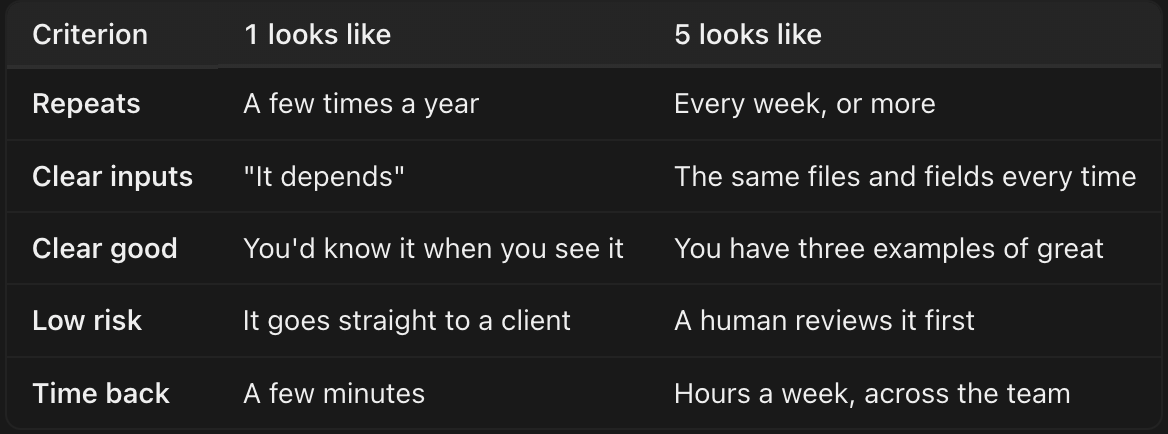
20 to 25: build it as a skill. 14 to 19: save a prompt first and build later. Under 14: keep doing it by hand. A tie? Pick the one with the lower risk.
“Clear good” is the one people skip. If you can’t show three examples of a great result, the skill has nothing to aim at, and neither does the person checking it.
Your four-week rollout
One workflow at a time. An hour or two a week is enough.
Week 1: Context. Install Claude Code. Write your CLAUDE.md. Then ask it to explain your business back to you. If it gets your buyer wrong, your file is wrong, not the AI.
Week 2: First skill. Pick the task with the highest score. Write the steps the way you’d brief a new hire: the job, what to read, what good looks like, what to check. Add three examples of a great result.
Week 3: Real data. Run it on real exports, not samples. Check every output by hand. When something’s wrong, fix the steps, not the output. Fixing the output fixes it once; fixing the steps fixes it every week after.
Week 4: Team. Show one teammate how to run it. Write down what it still gets wrong. Pick workflow number two.
Measure: hours back per week, outputs you used as they were, and mistakes caught in review. Ignore: how many skills you’ve built, how long your prompts are, and how many new tools you’ve tried.
Feed it your experience
The difference between a generic prompt and a useful one is almost always context you already have. A few rewrites:
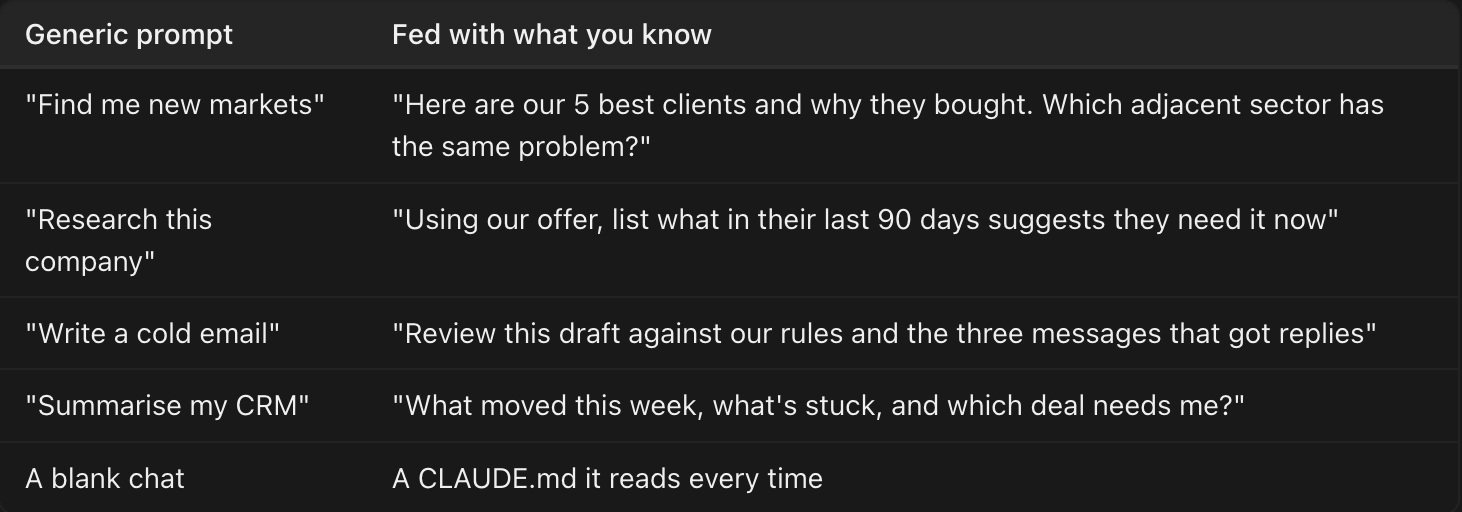
Every one of these starts from something only your firm knows. That’s the part competitors can’t copy by opening the same tool.
Red flags: stop and rethink
It sends anything without a human approving it. AI drafts. People send. Especially anything with your name or your client’s name on it.
Client data goes in without checking where it’s stored. Know what you’re sharing, where it lives, and whether your client agreements allow it. In Australia, the Privacy Act still applies when the tool is new.
You’re automating a process that doesn’t work by hand. Automation makes a broken process faster, not better.
Numbers in the output aren’t checked against a source. Market sizes, company facts and dates need a human and a source before they go anywhere.
Ten skills built, none used every week. Three skills you run every Monday beat ten you built on a Sunday afternoon.
Where this fits
Claude Code won’t pick your market for you. It won’t decide who your best clients are, or what your buyers need to hear. Those are still the decisions that win the work.
What it does is make sure every one of those decisions only has to be made once, and is there for every task after it. That’s what “AI fed with experience” means in practice.
The cheatsheet with everything above on one page is attached to this newsletter.
Setting up your first workflow and want a second pair of eyes on it? Reply with “MARKET” and tell me which task you’re starting with.
Ima Miri, AIPoint. Market discovery and outreach for specialist B2B firms across Australia and New Zealand.